How does AI chart analysis work?
Updated - Editorial policy
Chart Intelligence is the AI chart analysis built into the Trading Game chart. Tap the robot icon on any chart and it reads what is on screen, draws the important levels, explains what it sees in plain words and shows how confident it is. You then decide whether to open a practice trade. It is built to teach you how to read a chart, not to trade for you.
What the analysis is based on
Chart Intelligence is trained on the analysis of millions of practice trades made in Trading Game. It is tuned to read several things at once on the chart you have open:
- Technical indicators such as moving averages and momentum readings
- Trading volume, and whether a move is backed by volume or not
- Chart patterns, for example a descending channel, a support zone or a breakout
- The overall trend on the timeframe you are viewing
How these pieces are weighed against each other is our own method, refined on our own trade data, and it is what makes the analysis different from a standard indicator or a generic AI chat. The aim is simple: the most useful reading of the chart for someone who is learning.
What you see on the chart
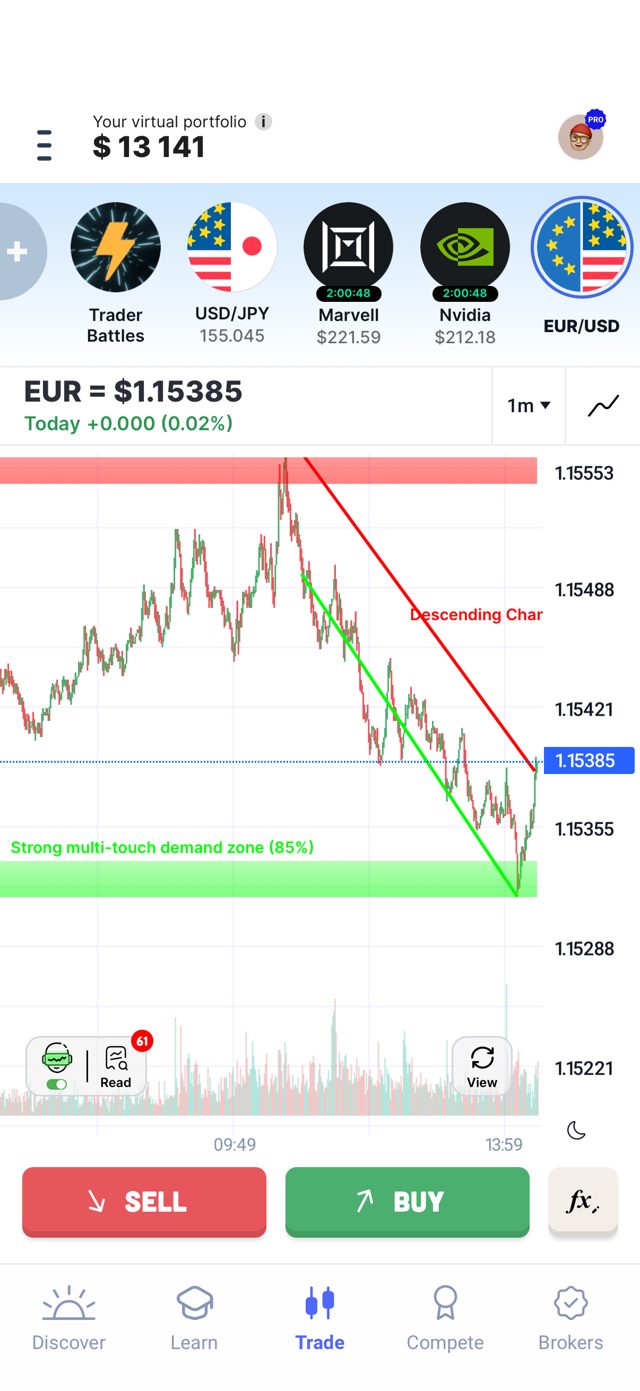
When you switch the analysis on, the AI draws simple lines and zones on the chart: trendlines, channels, support and resistance zones and the key level it is watching. Each drawing has a short label, so you can see at a glance why that line is there. Turn the toggle off and the chart goes back to clean candles.
The explanation panel
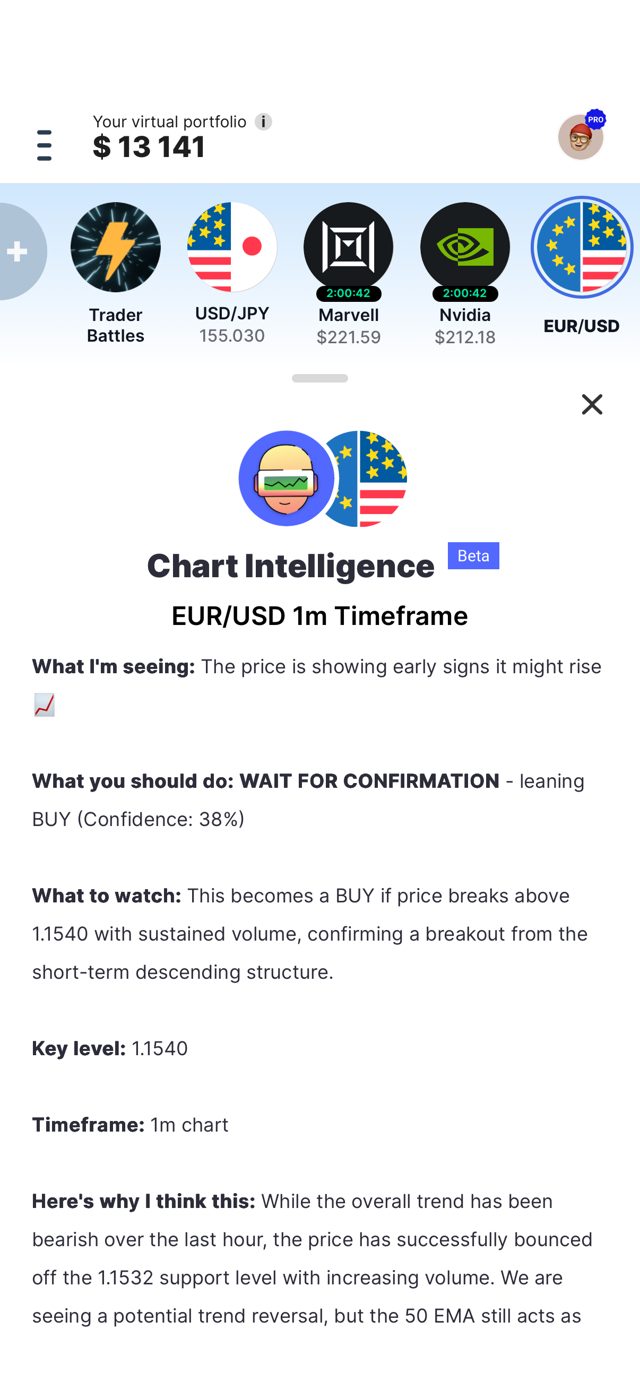
Tap the panel and the AI explains its main thinking in a fixed order, so every analysis reads the same way:
- What I'm seeing: the current picture in one sentence
- What you should do: the scenario it leans towards, or wait for confirmation
- What to watch: the price level or event that would confirm or cancel the scenario
- Key level and timeframe: the exact number and the chart it applies to
- Here's why I think this: the reasoning, tied to the trend, the levels and the volume it found
The point of showing the reasoning is that you can learn the process, not just the answer. Read the "why", look at the chart and check whether you see the same thing.
What the confidence percentage means
Every analysis comes with a confidence percentage. It shows how strongly the evidence on the chart supports the scenario described. The higher the percentage, the more likely that scenario is to play out. A low percentage, like the 38% in the example above, means the picture is mixed and the sensible reading is to wait for confirmation.
The decision is always yours. Use the percentage to judge how much weight to give the analysis, then choose whether to open a practice trade, wait, or do nothing.
Ways to use it
Before a trade. Run the analysis on the asset and timeframe you are looking at, read the reasoning, and compare it with your own view before you tap Buy or Sell.
As a private coach for your own analysis. Draw your own trendlines and write your notes on the chart first, then run Chart Intelligence. It checks your drawings and gives feedback on them. You can agree, disagree, adjust your lines and run it again. This back and forth is the fastest way to find out where your reading of a chart is strong and where it is not.
After a trade. Every practice trade is a lesson. Look back at what the analysis said, what you decided and what the market did, and note what you would do differently.
How it connects to lessons
When the AI recognises a chart pattern or a setup, it links it to the matching lesson in the Trading Academy. So if it marks a descending channel or a demand zone you have not met before, you can open the lesson, learn the idea, then come back to the live chart and see it in action. Everything the AI finds points to something you can study next.
This is the part we are most proud of. You learn on live market data, on the chart you are trading, instead of on old textbook examples. The pattern, the explanation and the lesson arrive together, which makes learning both faster and safer.
Does it help?
Our data covers over 3 million practice trades analysed with the AI. Users who analysed a chart before opening a practice trade achieved noticeably better results than users who traded without the analysis. Those are simulator results with virtual money, and past results in a simulator do not predict anything about real markets, but they show the approach works as a learning tool.
Keep in mind
- Chart Intelligence is in Beta and it can be wrong. Treat it as a second opinion, not an instruction.
- It works on the timeframe you have open. A 1 minute chart and a daily chart can give different readings of the same asset.
- All trades in Trading Game use virtual money. The analysis is for practice and learning, not financial advice.
Tip: Want to ask a follow-up question about what the AI found? Open Max, the AI trading coach, and ask him to explain the analysis in more detail.
Found something unclear or inaccurate?
Email an article correction